Tesla Update 2026.26 Takes the Browser to the Next Level
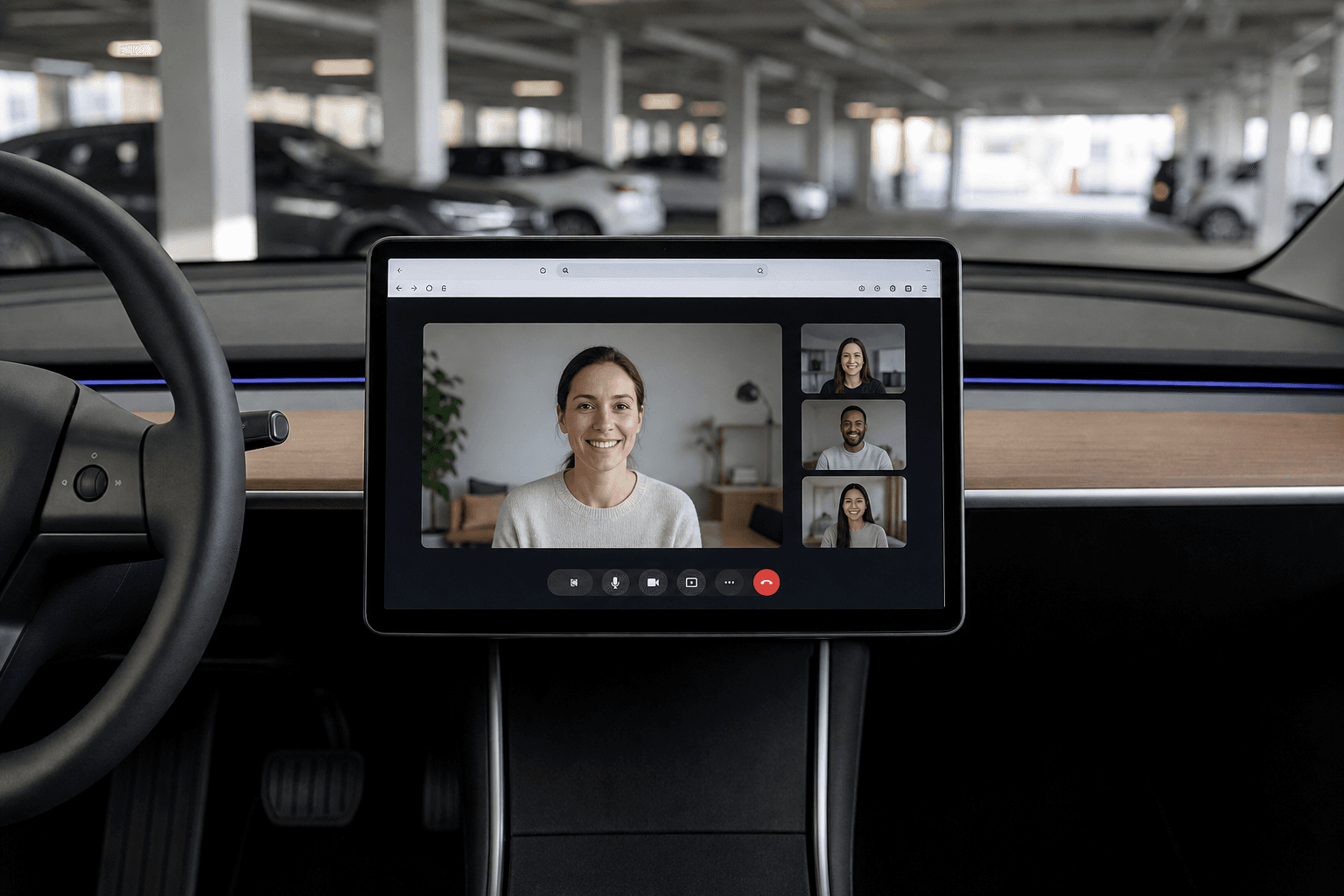
At first glance, Tesla's summer update 2026.26 may look like a convenience-focused release, but it could prove genuinely useful in everyday life. The integrated browser is getting several upgrades that turn it from a “last resort” into a real tool. The most exciting addition is camera and microphone support for web-based video calls.
This is particularly useful for drivers who sometimes use their car as a mobile office, such as while charging. At the same time, Tesla is taking a conservative approach to privacy: access is granted in a controlled manner and subject to clear restrictions.
Camera and Microphone in the Browser: Teams, Meet, Discord, and More
Websites in the Tesla browser can now request access to the cabin microphone and cabin camera. Each time, an on-screen prompt lets you approve or deny the request. Importantly, the camera can be used only while parked.
This allows video calls through popular web apps without Tesla having to develop a dedicated app. Microsoft Teams, Google Meet, Discord, and Slack are among the services mentioned. For many people, this is exactly the sweet spot: taking a quick call at a Supercharger without setting up a laptop.
One technically interesting detail is that the video feed apparently crops itself automatically to focus on the person in the driver's seat. The feature is also limited to vehicles with AMD Ryzen infotainment, leaving older Intel-based models without access.
Anyone who wants to test the feature without signing into a service can open a simple webcam and microphone test page in the browser. This makes it easy to check whether camera and audio permissions are working in their vehicle.
Bookmark Sync: Bookmarks Follow Your Tesla Profile
Also new: The browser can sync bookmarks across multiple Teslas when you use a Tesla Profile. This is useful not only for households with several vehicles, but also when using a rental car or replacement vehicle.
Syncing happens automatically, so there is nothing extra to enable. Favorites and frequently visited websites in the “New Tab” view remain linked to the relevant driver profile.
Larger Display Thanks to a New Default Zoom
Although Tesla's browser is based on Chromium, it previously had one noticeable drawback: You could not adjust the zoom manually. With 2026.26, Tesla is increasing the default zoom, making content appear larger and easier to read overall.
The catch is that some responsive websites may switch to a tablet or mobile layout because the page detects “less space.” That is not necessarily a bad thing, but it can noticeably change the layout of platforms such as video or social media sites.
More Full-Screen Video in the Browser: Easier Streaming
Another upgrade expands full-screen playback in the browser to more streaming sites. In practice, this feels like a broader Tesla Theater experience, even though it is still not the same as having native Theater apps.
In practical terms, you can switch to full-screen mode on selected video sites in the browser, making viewing much more enjoyable while parked. For vehicles with a rear display, this browser workaround still does not automatically provide seamless playback in the back.
What Is Happening Behind the Scenes?
Tesla has likely also updated the underlying Chromium version as part of this release. That may not sound exciting, but it often has noticeable benefits: fewer rendering issues, better compatibility with modern web standards, and greater overall stability when using complex web apps.
Assessment: Who Will Benefit Most?
If you have previously ignored the browser because it felt like a compromise, 2026.26 could change that. The update is not a “gimmick”; it is clearly aimed at real-world use cases: working, communicating, and streaming while the vehicle is parked.
Where the Update Excels
- Video calls in the browser without a dedicated app, including clear permission prompts
- Bookmark syncing via Tesla Profiles, useful when driving multiple vehicles
- Better readability thanks to a larger default zoom
- Full-screen video on more streaming sites in the browser
The Limitations
- The camera works only while parked, not while driving
- Camera and microphone features are available only in vehicles with AMD Ryzen
- The larger zoom can alter website layouts
How It Fits into the Tesla Ecosystem
Tesla is continuing to develop the idea that many features can be delivered through the web rather than as conventional apps. Anyone interested in the general direction of Tesla's current software will also find interesting developments involving topics such as FSD and hardware generations, including Tesla FSD v15, HW4, and Optimus.
And if you are looking for a specific model that benefits particularly strongly from infotainment updates in practice, the Tesla Model Y is one of the most widely driven Tesla models in the DACH region—Germany, Austria, and Switzerland—for good reason. For many, the Tesla Model 3 also offers the ideal balance of efficiency and long-distance capability.